Engineering for Continuity: The Exit Packet
The call came about two months after I had started a new job. On the line was a customer from my previous life as a consultant - an account I had spent years on, and had carefully handed over before I left. The new team was struggling, and they wanted me to come back for a few days to help them understand the environment I had left behind.
It was an awkward conversation. I now worked for a competing consulting company, so what should have been a simple technical discussion turned into a contractual exercise across three organizations. We eventually made it work, for a very limited time. But the call stayed with me, because it exposed a mistake - not one of negligence, but of assumption. We had treated the handover as something that begins when someone announces they are leaving.
Software engineering has matured around the opposite instinct for systems: they should be resilient to change. We design for hardware failures, service outages, and operational mistakes because we know failure is not an exception but something to expect and prepare for. Curiously, we rarely apply the same reasoning to our teams.
Most teams still assume that knowledge transfer begins at the moment of departure. Managers start scheduling handover meetings, documentation suddenly becomes a priority, and everyone races against a deadline nobody planned for. Sometimes it works. More often, the departing engineer spends their final days trying to compress years of technical decisions, context, and intuition into a handful of meetings and documents.
I no longer believe this is the right mental model. Continuity is not something you organize at the end of a project or at the end of someone’s tenure. It is something you design into the way you work from the very beginning. The same engineering discipline that leads us to build resilient systems should lead us to build resilient teams - teams that keep moving forward when people change roles, become unavailable, or move on to their next challenge. And the part teams overlook most is rarely technical: it is the web of relationships around the work, something I will return to as the *graph of humans*.
This article comes from two experiences that changed the way I think about ownership. They happened years apart and, at first glance, tell opposite stories. In reality, they exposed the same flaw.
The day I realized handovers are designed too late
The first happened early in my career, at a consulting company. I was responsible for one of our largest customer accounts, both for delivery and, given the nature of the projects, for the technical side as well. Over the years our team had built a sophisticated ecosystem around that customer: Microsoft BizTalk integrations, custom applications, reporting platforms on the Microsoft SQL Server stack, and bespoke components that had accumulated years of business knowledge.
When I decided to leave to pursue larger technical challenges in another city, I was determined to make the transition smooth. I had no interest in being “the person nobody could replace.” I wanted the incoming team to succeed after I left. We spent weeks organizing a proper knowledge transfer and agreed on six days of handover with the consulting company taking over the account. Even that felt optimistic: they were not simply inheriting software, but technologies and architectural decisions they had little experience with.
Then reality intervened. The customer changed consulting providers and drastically cut the transition period. Overnight, six days became two. We reprioritized, documented what we could, and warned the customer that some knowledge simply could not be transferred under those conditions. There was no conflict and no lack of goodwill - only business decisions that invalidated a carefully prepared plan.
Two months later came the call I opened this piece with. The problem was not that we had failed to organize a handover - we had spent weeks on it. The problem was that we had assumed the handover would happen *after* I announced my departure. By then, too much depended on a transition window nobody controlled.
Years later, I experienced something that looked like the opposite. I watched several talented engineers leave a team after years of contributing to important projects. They had created value, built relationships across the organization, and moved the team forward. Yet a few weeks after each departure, I had an unexpected feeling: it was almost as if they had never been part of the team.
I do not mean people forgot them. The projects continued, new priorities emerged, and everyone adapted. That is what healthy teams do. What struck me was subtler: very little of their *context* remained visible. The ongoing conversations, the rationale behind certain decisions, the network of relationships they had patiently built, and the direction they had in mind largely disappeared with them.
It was not the loss of knowledge that surprised me. It was the loss of continuity.
Looking back, neither story was really about handovers. Both were about continuity. In one case it was interrupted because there was not enough time. In the other it quietly disappeared because nobody had designed for it. A handover does not begin when someone resigns; by then, you are only packaging whatever continuity has - or has not - been built along the way.
Engineering for Continuity
When people hear “handover,” they think about someone leaving a company. That is the obvious scenario, and the least interesting one. Teams lose access to people all the time, often temporarily and without warning. Someone goes on parental leave. Someone is pulled into an urgent project. Someone is promoted, or moved during a reorganization, or becomes unavailable for health or personal reasons - because life does not respect sprint planning. Even a vacation can expose how much implicit knowledge sat with one person, when the rest of the team suddenly discovers nobody else knows how a process, relationship, or system actually works.
This is not a pessimistic way to think about engineering. It is a professional one.
We already accept that the systems we build must tolerate failure. We do not assume every dependency will be available, every deployment will succeed, every disk will stay healthy, or every customer will use the product exactly as expected. We design for reality. Teams deserve the same discipline.
If a project can only move forward while one specific person is available, the project has a resiliency problem. If a critical customer relationship exists only in someone’s inbox and memory, the team has a resiliency problem. If the reason behind an architectural decision is known only by the person who proposed it, the system has a resiliency problem. It may not appear on a dashboard, but it is still operational risk.
This is where ownership needs to be understood more broadly. We talk about owning architecture, implementation, testing, deployment, and operations. We expect senior engineers to weigh reliability, maintainability, security, scalability, and cost. Ownership should also include the moment when someone else has to continue the work. A project’s responsibility does not end when it ships, nor when you stop being the primary person driving it.
That does not mean you owe unlimited support to a former team. Once you leave, your responsibilities change. Even inside the same company, nobody should need permanent access to you to make progress. A short clarification call is reasonable; a recurring dependency is not. If a team needs days of reverse engineering every time someone changes role, the problem is not the person who left. The problem is that continuity was never treated as part of the engineering work.
This is the mindset I call **Engineering for Continuity**: the practice of designing your work so it can survive your absence. It is not about making people interchangeable, and it is not about pretending individual expertise does not matter. Expertise matters. Relationships matter. Judgment and taste matter. The point is not to erase individual contribution, but to ensure the value engineers create keeps compounding after they are no longer the ones carrying it.
Many engineers are implicitly taught the opposite. Early in a career, being the person who knows how to fix something feels valuable. Being the one everyone calls when a system breaks feels like recognition. Being indispensable can look like career security. In reality, it usually means the team has built a dependency around you instead of a capability around the work. That dependency does not scale.
As you grow in seniority, your value increasingly comes from enabling others to succeed without you in the loop. You still solve hard problems, but you are also expected to leave behind systems, practices, decisions, and context other people can use. A senior engineer should not only ask, “Can I build this?” but also, “Can the team keep owning this when I am no longer the person driving it?”
Engineering for Continuity is the practice. The Exit Packet - which we will come to - is its by-product. The document is only the visible artifact; the discipline that produces it matters more.
The mindset shift
My own mindset started to change when I joined Deezer.
Localization had become one of those internal processes that technically worked but relied on very few people. Only two of us in the development organization could really handle it end to end. We knew the process, the scripts, the quirks, the edge cases, and the strange things that could happen between a string being written by a developer and appearing correctly in the product. That knowledge made us useful - and made the process fragile.
The first instinct in that situation is to document more. Write the missing page, explain the scripts, list the steps, add the edge cases. That would have helped, and documentation was part of the answer. But it would not have changed the operating model. Developers would still have depended on the same two people to move through the workflow.
So we approached it differently. We built a web application that let developers manage their localization needs autonomously. The goal was not to make the two experts faster. It was to make most localization work no longer require an expert at all.
That project clarified a distinction I still use today: **solving a problem is not the same as removing the dependency that created it.** Solving the problem would have meant helping more people get through the localization process. Removing the dependency meant changing the system so they could get through it without us. Knowledge that used to live in people became embedded in a tool, a workflow, and a clearer path for the rest of the organization.
>This sentence resonates in a singular way in this agentic world. We have so many dependencies in our organization that reduces the speed of execution. Building a web of agents could change a team output by an order of magnitude.
That shift later shaped how I think about engineering effectiveness. At its best, effectiveness is not about automation or productivity tooling - it is about increasing the operating capacity of a team. It asks where people are blocked, where knowledge is trapped, where the same questions keep being asked, and where the organization relies on individual memory instead of shared systems.
This is also why I am careful with the idea of being indispensable. Being the only person who can do something may feel like proof of value, and sometimes it is. But it is also a signal that the team has not yet converted that expertise into a capability it can reuse. The better outcome is not to remain in the critical path forever. It is to make the path clearer for everyone else.
The Exit Packet
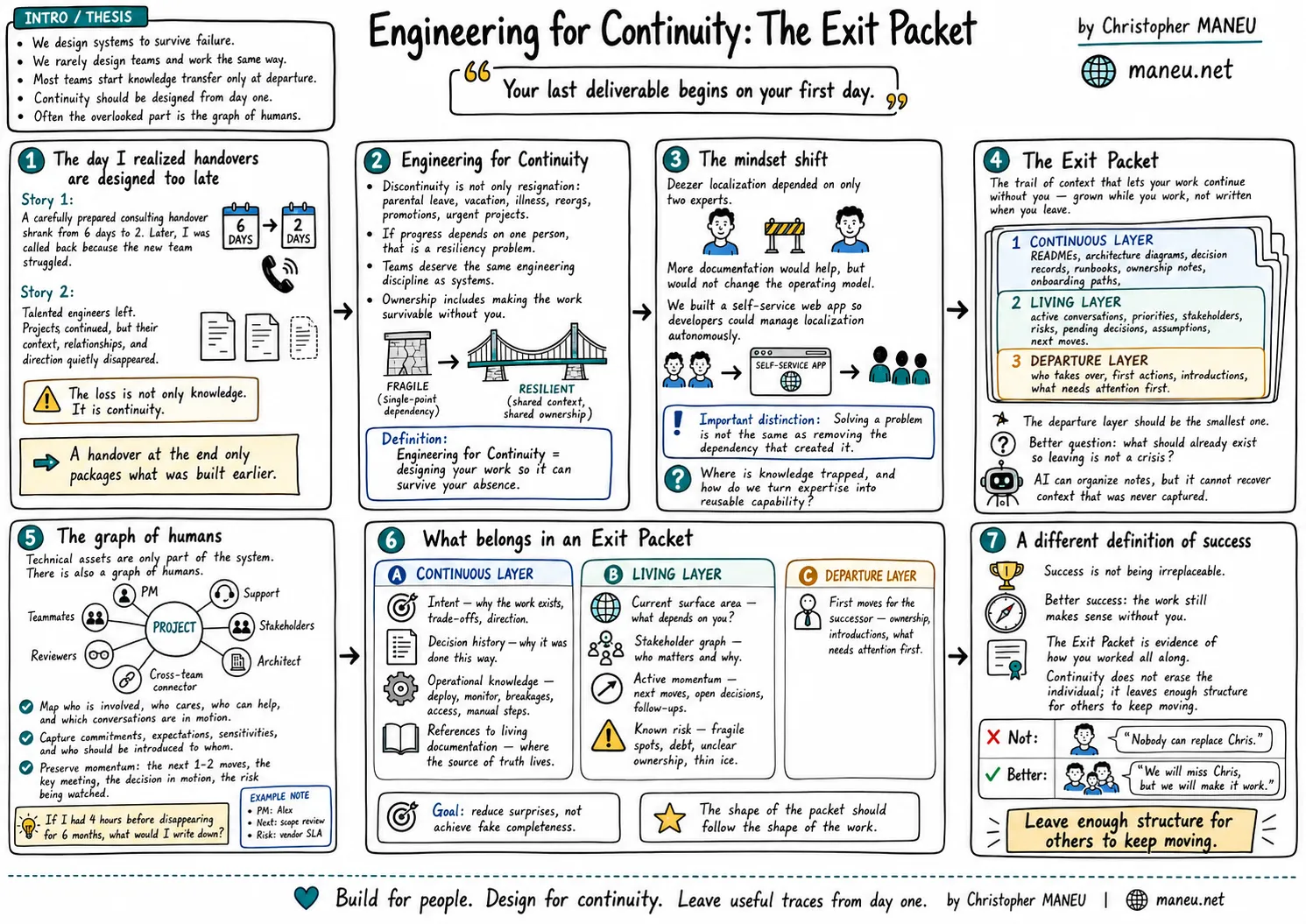
Here is a definition to hold onto: an Exit Packet is the trail of context that lets your work continue without you - grown while you work, not written when you leave.
The name may suggest a document you produce when you are about to leave a team. That framing is useful only up to a point. Yes, there may eventually be a document, a folder, a page, or a set of notes you hand to your manager and teammates. But if the Exit Packet only starts existing during your notice period, it will mostly reflect the continuity work you had already done - or failed to do - before that moment. It is not the beginning of the handover. It is the packaging of everything that made the handover possible.
This is why I do not start with a template. Templates can be misleading: they make the problem look like a form to complete, when the real problem is usually that the information was never captured, structured, or shared while the work was happening. A good template helps you organize knowledge. It cannot recreate context that lived only in your head for two years.
I prefer to think of an Exit Packet as three layers.
The **continuous layer** is what should exist regardless of whether anyone is leaving: READMEs, architecture diagrams, decision records, operational runbooks, ownership notes, onboarding paths, and links to where work is tracked. These are not created because you are preparing to leave. They exist because the project is meant to be understood, operated, and evolved by more than one person.
The **living layer** is the context that changes frequently and rarely fits traditional documentation: active conversations, current priorities, stakeholders, risks, pending decisions, assumptions being tested, and the next few moves you had in mind. This is often the most valuable layer during a transition, because it explains not only what exists, but what is currently in motion.
The **departure layer** is the part you write when a transition actually happens: who should take ownership, what needs attention first, which introductions to make, what you would recommend doing next, and what risks not to forget. It matters, but ideally it should be the smallest layer. If everything depends on it, you are rebuilding too much context at the worst possible moment.
That distinction changes the question from “What should I write before I leave?” to “What should already exist so that leaving is not a crisis?” - a far more useful question. It also makes the Exit Packet less dramatic. You do not need a polished, always-up-to-date handover document for every project. Keep the source of truth discoverable, leave a trail of important decisions, capture the context that would otherwise be lost, and periodically ask what someone would need if you were suddenly unavailable.
One question keeps this practical: **what would be hard to reconstruct later?** You do not need to document everything, only the context that would be expensive, risky, or impossible to rediscover. The command to start a service is easy to recover; the reason it exists in its current shape may not be. This is also why a decision record usually ages better than a polished architecture diagram: the diagram shows the current state, while the record explains the path that led there - the options considered, the constraints at the time, and what the team deliberately chose not to do. Even when the implementation changes, that reasoning survives. Modern AI tools can now turn scattered notes into a readable page, but they cannot recover context that was never captured. They change the cost of writing things down; they do not change the need to capture the context in the first place.
An Exit Packet is therefore not a bureaucratic artifact. It is a by-product of working in a way that respects continuity - something you grow while the work is alive, not something you write at the end.
The graph of humans
When people think about handovers, they start with technical assets: repositories, documentation, dashboards, environments, credentials, deployment pipelines, operational procedures. Those matter. If nobody knows where the code lives or how to deploy it safely, the transition will be painful. But in most engineering organizations - especially as you move toward senior roles - the technical map is only part of the system.
There is also a graph of humans: the network of people who make the work possible. The colleague who understands the historical reason behind a constraint. The product manager who knows which customer conversation triggered a priority. The support engineer who has seen the same issue three times in production. The stakeholder who must be consulted before a public commitment. The architect who disagreed with an earlier decision but accepted the trade-off. The person in another team who can unblock access, funding, capacity, or review.
None of this is secondary context. It is often what determines whether a project keeps moving. A repository tells you what changed. A decision record tells you why. A roadmap tells you what the team thinks it wants next. But the person inheriting your work also needs to know who is involved, who cares, who has concerns, who can help, and which conversations are already in motion. Without that map, they can read the code and understand the architecture, yet still spend weeks rediscovering the human operating system around the project: who to ask, who to warn, and whose quiet sign-off unblocks the next step.
So one of the most useful exercises is not “What documentation should I leave?” but something more constrained: **if I had four hours before disappearing for six months, what would I write down?**
My first answer would not be a system diagram. It would be a map of the active relationships around my work, and the immediate momentum of each workstream - the next moves, not a five-year strategy. Something like:
> *Ana (PM, Search) - owns the ranking roadmap. I committed to delivering the relevance API by Q3; she cares most about being warned early if that date slips. Introduce Ravi to her before I leave.*
>
> *Ravi (backend) - the only person besides me who understands the reconciliation job. Currently reviewing migration PR #482; it should merge this week.*
>
> *Next moves: (1) get Security sign-off on the token-rotation change - waiting on Priya since Tuesday. (2) Decide whether to keep the manual approval step; I lean toward removing it, but Finance hasn’t confirmed.*
>
> *Risk: the nightly export still depends on a hardcoded credential in the job config. It works, but it’s thin ice - rotate before it expires in October.*
Notice what this is and is not. It is not gossip or political commentary. There is a difference between “this stakeholder is difficult” and “this stakeholder has been burned by previous timeline changes, so they care about being informed early when scope changes.” The first is opinion; the second lets the next person operate with respect. Human context should help the team continue relationships, not bias them against people.
Momentum is underrated in handovers. When someone leaves, the team can usually rediscover information if it knows where to begin. What is much harder to reconstruct is direction. A project without momentum becomes a pile of accurate artifacts - links, documents, repositories, tickets - and the person inheriting it still has to infer what mattered most and what should happen next. A good Exit Packet preserves enough momentum for someone to take the first two steps. Not the next twenty. The goal is not to control the project after you leave; it is to reduce the time the team spends standing still.
This is why the graph of humans belongs in the Exit Packet. Engineering work moves through trust, alignment, reviews, commitments, and small acts of coordination that rarely appear in official documentation. The more senior you become, the more this matters: senior work spans teams and boundaries, and your contribution may be less about a single repository than about connecting people, constraints, and opportunities. If that connective tissue stays invisible, your departure removes more than your output - it removes part of the operating model. Not every interaction needs to be logged; that would be absurd. But the important active edges in the graph should be visible enough that someone else can continue the work with care.
When we talk about continuity, we should not only ask whether the code can be maintained. We should also ask whether the relationships around the work can survive the transition.
What belongs in an Exit Packet
At some point the discussion has to become concrete. If the Exit Packet is not a template and not simply a document written at the end, what does it actually contain? The goal is not completeness. It is to reduce surprises. The three layers give a useful backbone; here is what tends to belong in each.
**The continuous layer - what should be true regardless of any departure.**
-
**Intent.** Status becomes obsolete in a week; intent lasts. The reason a project exists, the problem it solves, the trade-offs behind it, and the direction you were creating remain valuable long after. This matters most when your work spans several projects: from the outside they may look unrelated, while in your head there is a strategy connecting them. If those connections between projects stay only in your head, the next person inherits fragments instead of a whole.
-
**Decision history.** Not every decision deserves a record, but the expensive ones do. If a future maintainer would reasonably ask “why did they do it this way?”, the answer should exist somewhere - especially for choices that look strange without context: an inherited constraint, a security requirement, a customer promise, a performance trade-off, a temporary solution that became permanent.
-
**Operational knowledge.** Where does the work run? How is it deployed? What breaks often? What should be monitored? What manual steps and access are required? Who gets called when something goes wrong? This looks boring until the first incident after the person who knew it all has left.
-
**References to living documentation.** The Exit Packet should not duplicate every README, diagram, or runbook - duplication decays. It should act as a guide to the existing sources of truth: link to what exists and explain why it matters, and be honest about the gaps where it does not.
**The living layer - what is currently in motion.** Two of its most important elements - the stakeholder graph and the immediate momentum of each workstream - are the subject of the graph-of-humans section above, so I will not repeat them here. What remains:
-
**Current surface area.** What are you responsible for? Which projects, systems, relationships, or recurring processes depend on your involvement? Not an exhaustive inventory of every task - the parts where your absence would create uncertainty. This is the map of where to pay attention first.
-
**Known risk.** An Exit Packet should describe what worries you, not only what works: the fragile integration, the unclear ownership boundary, the misaligned customer expectation, the technical debt that is acceptable for now, the process that depends too much on one person. Not a list of complaints - a way for the team to tell stable ground from thin ice.
**The departure layer - what you add when a transition actually happens.**
- **First moves for the successor.** Who should take ownership, what needs attention first, which introductions to make, and what you would recommend doing next. If everything important lives here, too much context is being rebuilt at the worst possible moment.
I would avoid turning this into a giant universal checklist. Checklists help execution, but they create the illusion that every transition is the same. The Exit Packet of a platform engineer, a staff engineer, an engineering manager, a security specialist, and a developer advocate will not look identical. The shape of the packet should follow the shape of the work.
A better test: if someone opened your Exit Packet with no access to you, could they understand what mattered, where to look, who to talk to, what was in motion, and what would be dangerous to ignore? If yes, it is probably good enough.
A different definition of success
The Exit Packet is easy to misunderstand as a departure artifact - something pessimistic or slightly theatrical, prepared for the day you resign or get reassigned. That is not the right interpretation. It is not about leaving well. It is about working in a way that makes leaving less exceptional.
That changes the definition of success. Success is not that nobody can replace you. It is not that people keep calling you months after you leave because you are still the only one who understands the system. It is not that your name stays attached to every decision and every relationship. Those things may feel flattering, but they usually mean the work never fully became owned by the team.
A better definition: the work continues to make sense without you. The team understands the intent. The important decisions have a trail. The operational knowledge is discoverable. The relationships can be continued with respect. The risks are visible. The next person has enough momentum to take the first steps without reconstructing everything from scratch.
This does not make people interchangeable. Engineering is not assembly-line work, and the best teams are shaped by the judgment, taste, and history of the people inside them. When someone leaves, something real changes - some conversations, some decisions, some relationships will be different. That is normal, even healthy. Continuity does not mean freezing the organization in the shape you left behind. It means leaving enough structure for others to keep moving.
I like thinking about the Exit Packet less as a document and more as evidence. Evidence that you did not confuse ownership with control. Evidence that you treated documentation as part of engineering, not paperwork. Evidence that you understood the graph of humans around your work. Evidence that you cared about what would happen after your direct involvement ended.
One day I will leave every project I am working on today - maybe for another team, maybe because priorities change, maybe simply because that is how careers work. When that happens, I do not want people to pretend my absence changes nothing. If I have done meaningful work with people I respect, I hope they will notice.
But I also hope they will be able to continue. The sentence I would like to hear is not:
*Nobody can replace Chris.*
It is:
*We will miss Chris, but we will make it work.*
That is the point of Engineering for Continuity: not to erase the individual, but to make the work stronger than any single person. Not to treat departure as a special event, but to design the work so transitions are survivable.
Your last deliverable does not begin when you announce you are leaving. It begins on your first day.